
Rīki (Tools)
Ar ko tavs AI ir savienots — tavām īstajām lietotnēm un datiem.
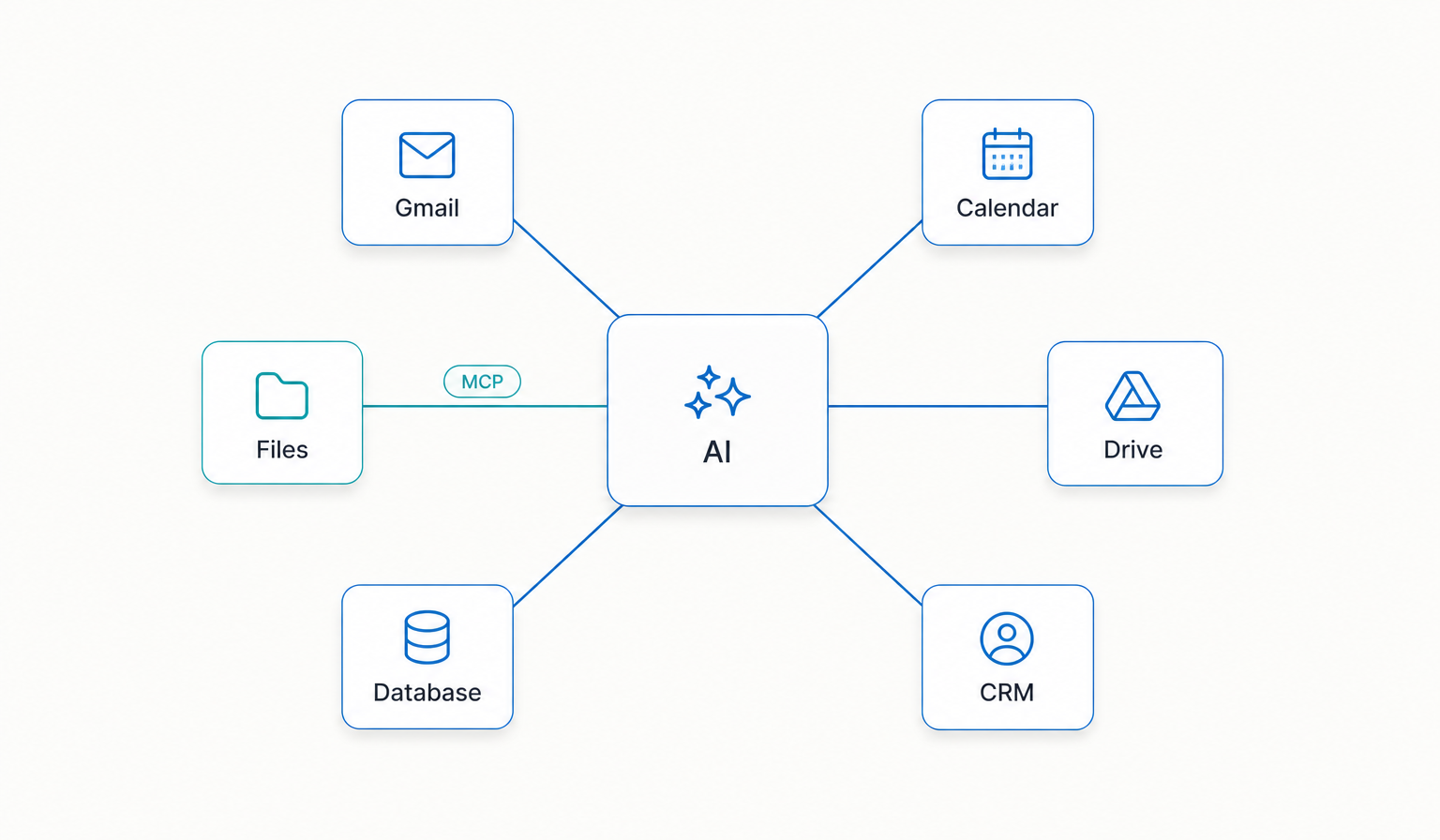
Prasme spēj domāt, bet viena pati tā nespēj sniegties tavā īstajā darbā. Rīki ir tie, kas dod tai rokas. Šis ir slānis, kas savieno tavu AI ar īstajām lietotnēm un datiem, uz kā balstās tava dzīve: tavi faili, e-pasts, kalendārs, CRM, datubāzes, automatizācija.
Kad šie savienojumi pastāv, tavs AI var nolasīt, kas patiešām notiek, un rīkoties tavā vārdā — ne tikai par to runāt.
Tavas AIOS rokas un maņas.
Cilvēka analoģijā Rīki ir tavas rokas un maņas. Raksturs, atmiņa un prasmes dzīvo galvā. Bez rokām nekas no tā neskar pasauli. Šeit ir tāpat.
AI bez rīkiem ir gudra saruna. AI, kas iespraudies tavā īstajā darbā, ir partneris, kas patiesi paveic lietas tajās sistēmās, ko jau lieto.
Savienotāji un atvērti protokoli — uz taviem noteikumiem.
Šie savienojumi notiek caur to, ko nozarē sauc par savienotājiem (connectors), bieži izmantojot tieši šim mērķim veidotus atvērtos protokolus, lai AI modelis droši varētu runāt ar tavām lietotnēm. Tev nav jāsaprot visa mehānika, lai satvertu ideju.
Tagad ir standarta veids, kā ļaut AI redzēt tavu kalendāru, nolasīt pareizo e-pastu, izvilkt ierakstu no CRM vai palaist automatizāciju — tev izlemjot, ko tas drīkst aizskart. Tehnoloģija, kas to ļauj darīt kārtīgi, ienāca pavisam nesen un ātri uzlabojas, un tā ir liela daļa iemesla, kāpēc savas AI sistēmas būvēšana pēkšņi ir reāla parastam cilvēkam, ne tikai inženieriem.
“Lēni un stabili vienmēr pārspēj ātri un haotiski. Tie, kas iet lēnām, beigās nonāk ātrāk.”
Šeit lasīšana pārtop darīšanā.
Šis ir solis, kur AIOS pārstāj būt interesanta un kļūst vērtīga. Lasīt un domāt ir noderīgi. Darīt ir tas, kur atgriežas laiks. Kad tava sistēma patiesi sagatavo e-pastu, atjaunina ierakstu, izvelk atskaiti un izceļ to, ko būtu palaidis garām, tu esi pārgājis no gudrāka čata uz strādājošu asistentu, kas darbojas tavā īstajā dzīvē.
Šeit arī īpašumtiesības kļūst konkrētas. Kad tavs AI savienojas ar rīkiem caur savienojumiem, ko tu kontrolē, tu izlem, ko tas redz un ko drīkst. Vari atļaut piekļuvi, ierobežot to un atsaukt. Savienojumu īpašums ir sistēmas īpašums.
Vispirms lasi. Rīkojies, kad uzticies. Paplašini uzmanīgi.
Šeit ir daļa, ko lielākā daļa saprot nepareizi, un tas ir svarīgākais šajā lapā. Viņi mēģina savienot visu uzreiz. Katru lietotni, katru integrāciju, katru gudro rīku pirmajā nedēļā. Tas jūtas kā progress un rada pārslodzi.
Pareizais ceļš ir pretējs. Savieno tos dažus rīkus, kur tavs darbs patiesi dzīvo — tos, kuros esi katru dienu. Sāc ar lasīšanas piekļuvi, lai sistēma vispirms redz tavu darbu, pirms to var mainīt. Tad, kad uzticies, ļauj rīkoties — pa vienai spējai. Paplašini tikai tad, kad iepriekšējais savienojums patiesi ir nopelnījis vietu.
Nemaksā par rīku, kamēr tiešām to nelietosi.
Rīki ir arī tā vieta, kur ielien izdevumi — abonements šeit, pakalpojums tur — un kur mīt bailes no piesaistes. Abus var pārvaldīt ar vienu likumu: nemaksā un neapņemies par rīku, kamēr to patiesi nelietosi. Pieslēdz to, kas vajadzīgs tagad. Pārējo atstāj, kad būs īsts iemesls.
Tā kā tavs raksturs, atmiņa un prasmes dzīvo tavos paša failos, rīki paliek nomaināmi. Vari nomainīt savienotāju, nezaudējot sistēmu — tā tieši ir tā brīvība, ko sava AI piederība mēdz dot.
Ko cilvēki lieto
- 01Savienotāji un atvērti protokoli kā drošais tilts.
- 02Tavi faili un glabātuve, e-pasts un kalendārs.
- 03Tavs CRM un datubāzes.
- 04Automatizācija atkārtotajam darbam — vispirms lasi, rīkojies, kad uzticies.
Savienot visu par ātru.
Tas izskatās pēc ātruma un rada haosu. Pieslēdz tos dažus rīkus, uz kuriem patiesi balstās tavs darbs, sāc ar to, ka sistēma lasa, un nopelni katru nākamo savienojumu.
Vairāk par Rīki slāni drīzumā blogā.
Gribi uzbūvēt savu kopā ar mums? Pievienojies gaidītāju sarakstam